

How a Busy Healthcare Facility Saved Time and Solved In-App ID Capture Challenges
How a Busy Healthcare Facility Saved Time and Solved In-App ID Capture Challenges
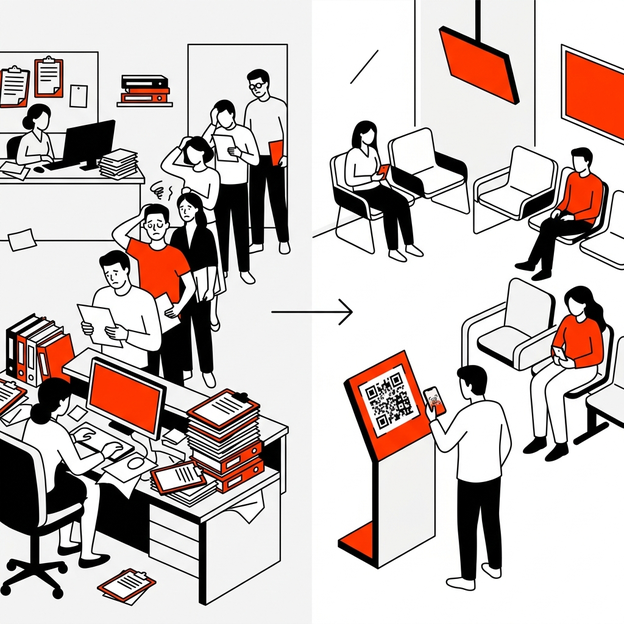
For clinic managers, private practice owners, and compliance officers, the front desk lobby is the operational epicenter where patient experience, security enforcement, and regulatory compliance converge. When the system at the front desk fails, the ripple effects are felt across every department — from delayed appointments to compromised audit trails.
This case study examines the operational transformation of a multi-physician outpatient clinic that replaced its manual paper-based check-in system with a QR-driven digital patient sign in sheet and In-App ID Capture workflow. The results included measurable time savings, strengthened HIPAA compliance, and a streamlined lobby experience for both patients and staff.
1. Pre-Implementation: The Lobby Bottleneck and Security Gaps
The Manual Check-In Burden
Before the transition, the clinic operated a traditional front desk workflow that relied on:
- A physical clipboard patient sign in sheet placed on the reception counter.
- Printed HIPAA acknowledgment forms that patients signed with a shared pen.
- A manual process where receptionists would photocopy driver’s licenses or insurance cards using a desktop scanner to verify patient identity.
During peak hours — typically between 8:00 AM and 10:30 AM — the lobby experienced severe congestion. With an average of 45 patients arriving within a 2.5-hour window, the single-point check-in created a queue that regularly extended to 15–20 minutes of wait time before patients even reached the front desk.
Unverified Guest Identities and Security Threats
Beyond the patient workflow, the clinic also hosted a steady flow of non-patient visitors:
- Medical equipment sales representatives
- Pharmaceutical consultants
- IT maintenance contractors
- Cleaning and sanitation staff
These visitors were checked in using the same shared clipboard. The process did not include identity verification, meaning there was no photographic record of who entered the facility on any given day. This gap created a significant security vulnerability — if an unauthorized individual entered a restricted area, administrators had no reliable record to trace entry.
During a routine HIPAA compliance review, the clinic received a formal advisory noting that the front desk lacked an adequate visitor tracking system to identify and log non-patient visitors with verifiable identification.
2. The Transition to a QR-Based Digital Check-In System
Selecting the Right Solution
The clinic’s compliance officer evaluated three categories of digital check-in solutions:
|
Solution Type |
Hardware Cost |
Hygiene Risk |
ID Capture |
HIPAA Compliance |
|
iPad Kiosk |
$1,500–$3,000 per unit |
High (Shared touchscreen) |
Limited (External scanner needed) |
Moderate |
|
Dedicated Check-In Terminal |
$5,000+ per unit |
High (Shared surface) |
Built-in camera (Fixed angle) |
High |
|
BYOD QR Check-In (SigninLink) |
$0 (Print QR flyer) |
None (Patient’s own device) |
In-App ID Capture (Phone camera) |
High |
The deciding factors were the elimination of shared hardware, the zero-cost deployment model, and the built-in In-App ID Capture feature that allowed visitors to photograph their own identification directly within the mobile check-in flow — without requiring a desktop scanner or a shared tablet camera.
Deployment Process
The clinic deployed the new check in system in four steps:
- Customized Check-In Forms: The compliance officer created three separate digital check-in flows within the SigninLink dashboard:
- Patient Flow: Name, date of birth, physician selection, HIPAA acknowledgment signature, and insurance card photo upload.
- Contractor/Vendor Flow: Name, company, host staff member, purpose of visit, NDA signature, and government-issued ID photo capture.
- Staff Clock-In Flow: Name, department, clock-in timestamp (for part-time staff and locum physicians).
- QR Flyer Placement: Branded QR code flyers were printed and displayed at three strategic locations:
- The main entrance door (allowing patients to begin check-in while walking in).
- The reception counter (for visitors who missed the door flyer).
- The seating area (for patients who arrived early and wanted to check in while seated).
- In-App ID Capture Configuration: The ID Capture field was set as mandatory for all contractor and vendor check-ins, and optional for patient check-ins (used primarily for new patients requiring identity verification).
- Staff Training: Front desk receptionists were trained to monitor the real-time lobby dashboard rather than managing the physical queue. The dashboard displayed each visitor’s name, check-in time, assigned physician, and ID photo — all accessible from the receptionist’s desktop browser.

3. Customer and Staff Adoption
Patient Reception
The transition period lasted approximately two weeks. During the first week, a front desk assistant stood near the entrance to guide patients through the QR scanning process. By the second week, the majority of patients completed check-in independently.
Key adoption observations:
- Smartphone penetration was not a barrier. Over 94% of arriving patients had a smartphone capable of scanning a QR code. For the remaining 6% (primarily elderly patients), the receptionist used a staff tablet to complete the check-in on their behalf.
- Privacy was the most cited positive feedback. Multiple patients noted that they appreciated not having to write their name on a visible clipboard where other patients could see it.
- Check-in time dropped from an average of 4.2 minutes to 1.1 minutes per patient, as measured by comparing lobby camera footage timestamps before and after deployment.
Staff and Contractor Compliance
For non-patient visitors, the mandatory In-App ID Capture field ensured that every contractor who entered the facility had a timestamped photo of their government-issued ID stored in the encrypted SigninLink database.
- Contractors reported that the process was faster than waiting for a receptionist to photocopy their license.
- The compliance officer could now run a visitor tracking report filtered by date range, visitor type, and host staff member — a process that previously required sorting through physical file folders.
4. Final Results and Audit Readiness
After 90 days of operation, the clinic measured the following outcomes:
|
Metric |
Before (Paper) |
After (SigninLink QR) |
Change |
|
Average Patient Check-In Time |
4.2 minutes |
1.1 minutes |
-74% |
|
Peak Hour Lobby Queue Length |
12–18 patients |
2–4 patients |
-78% |
|
Contractor ID Verification Rate |
~40% (Manual, inconsistent) |
100% (Mandatory In-App Capture) |
+60pp |
|
Time to Generate Audit Report |
2–4 hours (Manual file search) |
Under 30 seconds (Dashboard export) |
-99% |
|
HIPAA Front Desk Advisory Findings |
1 formal advisory |
0 findings |
Resolved |
Audit Readiness
When the clinic underwent its next scheduled HIPAA compliance review six months after deployment, the compliance officer was able to:
- Export a complete visitor log for the audit period in under 30 seconds.
- Present timestamped, encrypted ID photos for every non-patient visitor who accessed restricted areas.
- Demonstrate that patient check-in data was never exposed on a shared surface or visible to other lobby visitors.
The auditor noted zero front desk compliance findings — a direct improvement from the previous advisory.
5. Implementation Checklist for Healthcare Clinic Managers
For clinic managers considering a similar transition, this operational checklist provides a practical starting framework:
- Audit Current Lobby Workflow: Document the existing check-in process, including average wait times, shared-surface touchpoints, and identity verification gaps.
- Define Visitor Categories: Separate check-in flows for patients, contractors, pharmaceutical reps, and staff.
- Configure Mandatory Fields: Set ID Capture as required for all non-patient visitors. Enable HIPAA acknowledgment signatures for patient flows.
- Position QR Signage: Place flyers at the entrance, reception desk, and seating area to distribute the check-in load and prevent queuing.
- Train Front Desk Staff: Transition receptionists from clipboard managers to dashboard monitors. Ensure they can assist smartphone-less visitors.
- Schedule a 30-Day Review: After one month, compare lobby wait times, visitor verification rates, and staff feedback against your pre-deployment baseline.
Conclusion
This case study illustrates a measurable, repeatable outcome: a busy healthcare facility eliminated its lobby bottleneck, achieved 100% contractor identity verification, and resolved a standing HIPAA compliance advisory — all by replacing a paper clipboard with a zero-hardware, QR-based check in system.
The transition required no capital expenditure on hardware, no app installation for patients, and no disruption to clinical operations beyond a two-week adoption period.
For clinic managers and compliance officers looking to replicate these results, start a free trial of SigninLink and deploy your secure digital check-in within the hour.

